Vibration marks during turning operations are a common machining problem. Once vibration marks appear on the workpiece surface, they not only reduce surface finish quality but may also affect dimensional accuracy. In severe cases, they can even impact assembly performance of precision components. In many machining workshops, visible waviness, tool marks, and periodic vibration patterns often appear when machining slender shafts, stainless steel, or large-diameter workpieces. If vibration issues are not resolved in time, they can accelerate tool wear, increase machine load, and reduce overall machining efficiency. Understanding the causes of vibration marks in turning and adjusting machining conditions accordingly helps improve machining stability and product quality.
What Are Vibration Marks in Turning?
Vibration marks refer to regular wave-like patterns or oscillation traces appearing on the surface of a machined workpiece. These patterns are mainly caused by vibration during the cutting process and are a typical issue in mechanical machining. In many cases, vibration marks not only affect appearance but also reduce dimensional accuracy and assembly reliability. For precision parts, severe vibration marks may render the product unusable.
Impact of Vibration Marks on Machining Quality
When vibration marks appear on a workpiece, they directly affect machining results:
- Reduced surface roughness quality
- Poor surface finish
- Unstable dimensional accuracy
- Increased tool wear rate
For precision components, severe vibration marks may even lead to scrapping of the part.
Difference Between Vibration Marks and Regular Tool Marks
Vibration marks are often confused with normal tool marks. Regular tool marks are typically uniform and represent normal cutting traces, while vibration marks show periodic fluctuations with uneven wave depth. They are usually accompanied by abnormal cutting noise. Once vibration marks appear, it usually indicates that machining stability has been compromised and inspection of the machine, tool, and cutting parameters is required.
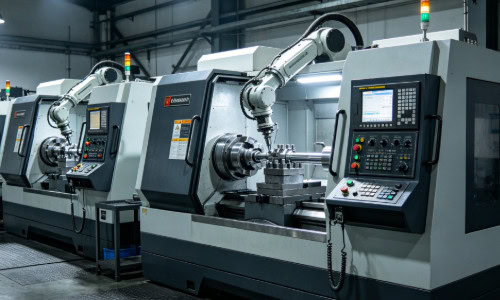
Insufficient Machine Rigidity Can Cause Vibration Marks
In turning operations, insufficient machine rigidity is one of the main causes of vibration marks. Older machines or smaller lathes are especially prone to vibration during high-speed cutting or heavy-duty machining. When machine rigidity is insufficient, even properly selected tools and parameters may not prevent surface waviness.
Spindle Rigidity Issues
If the spindle lacks rigidity during high-speed rotation, slight oscillation may occur.
Common situations include:
- Worn spindle bearings
- Excessive spindle clearance
- Reduced precision due to long-term use
- Overloading during high-speed machining
Spindle vibration is directly transmitted to the workpiece surface, forming regular vibration patterns.
Tool Holder Stability Issues
When the tool holder lacks rigidity, vibration is likely to occur during cutting. In many workshops, tool overhang is too long for convenience, which significantly reduces rigidity. Small tool shanks, loose clamping, and worn tool holders also contribute to instability. These issues become more obvious during heavy cutting operations.
Workpiece Clamping Instability
Poor workpiece clamping can also lead to vibration marks. Slender shafts are particularly sensitive to this issue, as they tend to deflect during machining. Without proper tailstock support or steady rest usage, vibration becomes more severe. Even if the machine condition is normal, insufficient workpiece rigidity can still cause vibration marks.
Improper Cutting Parameters Can Cause Vibration Marks
Besides machine rigidity, improper cutting parameter settings are another major cause of vibration. In many cases, vibration marks are not caused by machine failure but by unstable parameter matching. If cutting speed, feed rate, and depth of cut are not properly balanced, machining stability can be compromised.
Excessive Cutting Speed
At high cutting speeds, friction between tool and workpiece increases, amplifying vibration effects. Common symptoms include high-frequency noise, visible surface waviness, and rapid tool temperature rise. Stainless steel and hardened materials are particularly sensitive to high-speed cutting, which can easily trigger vibration marks. Some operators increase spindle speed to improve efficiency, but this often worsens vibration issues.
Improper Feed Rate Selection
Excessive feed rate increases cutting force significantly, leading to unstable tool loading. If workpiece rigidity is insufficient, excessive feed causes deflection and increased cutting impact. On the other hand, too low feed rate may also generate friction-induced vibration, resulting in fine surface waviness. Different materials and machining stages require different feed settings.
Improper Depth of Cut
Depth of cut directly affects cutting load. Excessive depth increases machine load and vibration risk, while too shallow cutting may lead to rubbing instead of cutting. This is especially problematic in stainless steel machining, where work hardening may occur. Many vibration issues are directly related to improper depth of cut settings.
Tool-Related Issues Are Also a Major Cause of Vibration Marks
Tool condition directly affects cutting stability. If tools are worn or improperly selected, vibration is likely to occur. In many cases, operators only adjust parameters without considering tool condition, which fails to solve the problem.
Severe Tool Wear
As tools wear, cutting edges become dull, increasing cutting resistance. This leads to higher tool temperatures, rough surface finish, and increased vibration. Severe flank wear is especially problematic, often causing wave-like surface patterns. If the tool is heavily worn, simply reducing cutting speed may not eliminate vibration marks.
Improper Tool Geometry
Different materials require different tool geometries. If the rake angle is too small, cutting resistance increases; if clearance angle is insufficient, friction increases; if nose radius is too large, vibration may be amplified. Mismatch between tool geometry and material significantly reduces machining stability.
Excessive Tool Overhang
The longer the tool overhang, the lower the rigidity. In deep machining or special setups, excessive overhang leads to tool deflection and oscillation. At high cutting speeds, this vibration becomes more pronounced. Many vibration issues are directly related to excessive tool extension.
How to Reduce Vibration Marks in Turning
Although vibration marks are common, most cases can be improved through proper machining adjustments. Improving system rigidity and optimizing parameters are key factors in reducing vibration.
Improve Machine and Workpiece Stability
During machining, overall rigidity should be improved by:
- Reducing tool overhang length
- Increasing workpiece clamping force
- Using tailstock or steady rest support
- Regularly checking spindle condition
Once stability improves, vibration issues are usually significantly reduced.
Optimize Cutting Parameters
Cutting parameters should be adjusted according to material and working conditions:
- Reduce cutting speed when necessary
- Adjust feed rate appropriately
- Use multi-pass cutting
- Avoid excessive load cutting
Small parameter adjustments can often significantly reduce vibration marks.
Select Appropriate Cutting Tools
Different materials require different tool types. For stainless steel, high-toughness inserts are more suitable. For finishing operations, sharper cutting edges are preferred. For heavy cutting, stronger tool holders are required. Proper tool selection greatly improves machining stability.
Common Misconceptions in Handling Vibration Marks
In many workshops, operators attempt to solve vibration marks simply by reducing speed or feed rate. However, vibration is often caused by multiple factors, and single-parameter adjustment is usually ineffective.
Some operators ignore machine wear conditions and continue high-speed machining even when spindle clearance is excessive. Others continue using heavily worn tools, which worsens vibration. In slender shaft machining, lack of tailstock support often leads to periodic vibration marks. Effective resolution requires consideration of machine condition, tool condition, workpiece structure, and cutting parameters together rather than relying on a single adjustment.